Third-Party Risk Management
Vendor risk management. In the same platform, not a separate tool.
Classify vendors by risk tier, send AI-scored assessments through a white-labeled portal, and run review cycles without adding another subscription.
Classify vendors by risk tier, send AI-scored assessments through a white-labeled portal, and run review cycles without adding another subscription.
TPRM is usually a second vendor, a second login, and a second invoice. Or it’s a spreadsheet of questionnaires you send to vendors and never hear back on. Either way, you’re managing vendor risk outside the compliance platform where it matters — disconnected from the controls vendors are supposed to help you satisfy.
Meanwhile, your auditor is asking: “Who are your critical vendors? Have you assessed them? What’s their risk score?” And you’re scrambling to pull it together from three different places.
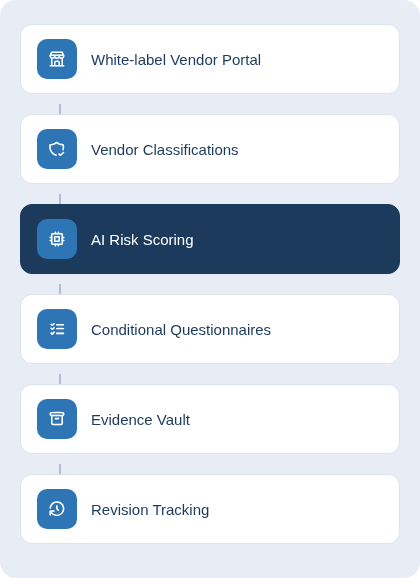
The TPRM flow in RealCISO:
Add vendors to your TPRM registry. Assign each a risk classification (Critical, High, Medium, Low) based on what they do — data access, infrastructure, authentication, development tools.
Create Questionnaire Templates with questions tailored to each risk tier. Conditional sub-questions let you dig deeper only for critical vendors. Reuse templates across your vendor base.
Generate a token-based Vendor Portal link and send it to the vendor. No vendor account required. They complete the questionnaire in a branded, white-labeled portal that looks like yours, not ours.
The moment they submit, Cleo AI analyzes the responses and generates a risk score (0–100). Findings are auto-generated and categorized (Critical, High, Medium, Low, Informational). You review and refine each finding — no black boxes.
Link findings to your Risk Register or Planner. Run review cycles so assessments don’t expire unnoticed. Request revisions if vendor responses change your risk posture.
Dashboard shows vendor portfolio, classification breakdown, upcoming reviews, findings summary, evidence gaps. One report answers “who are your vendors, how do you assess them, what’s the risk?”
The portal your vendors see is yours, not RealCISO’s. Custom domain (vendor-portal.yourcompany.com), your logo, your colors. Vendors have no idea it’s powered by RealCISO — it’s your process.
Cleo doesn’t just log vendor responses. It analyzes them against industry norms, identifies red flags, generates findings with severity, and produces a composite risk score. You review, approve, or override the score — you stay in control.
Define risk tiers once (Critical, High, Medium, Low). Set score thresholds for each tier. Assign review frequencies (annual, biennial, every 3 years). Specify required evidence types (SOC 2, ISO cert, insurance). TPRM automatically enforces the cadence.
Ask all vendors 5 base questions. But only for Critical vendors, ask 15 follow-ups. Eliminate noise, focus assessment effort where risk is highest.
Vendors attach certs, SOC 2 reports, insurance docs. Cleo catalogs them and compares against what your classifications require. Gap analysis shows missing evidence at a glance.
Vendor risk posture changes? Request a revision. Cleo re-scores and updates findings. Review cycles are auto-generated based on classification — no manual tracking.
TPRM lives at the organization level, not per-environment. So a single vendor is assessed once, and that assessment is visible across all your product/client environments that depend on that vendor.
Book a 30-minute demo to see white-label vendor assessment with AI scoring.
No separate TPRM tool. Classify vendors, send assessments, track findings
—built into your compliance platform.